


Invoices

Digitalization and Digital Transformation of
Invoices with DocThor CloudConnect

DocThor CloudConnect can handle your invoices and import them automatically into your system.

Please find example Videos here:
Workflow Webapplication
Workflow Outlook
Full automation – Document import and handling

Supported formats:

  • Microsoft Excel (xlsx | xls | xlsm)
  • Microsoft Word (docx | doc)
  • Emailbody-Text
  • Rich-Text-Format (rtf)
  • Comma separated Files (csv)
  • Extensible Markup Language (xml)
  • JavaScript Object Notation (json)
  • EDI
  • UN-EDIFACT
  • Adobe PDF (pdf)
  • HTML (htm | html)
  • Image Files (jpg | jpeg | tif | tiff | png | bmp)

Other formats on request.

[icon name=“arrow-left“ class=““ unprefixed_class=““] Back to Overview

Orders

Digitalization and Digital Transformation of
Orders with DocThor CloudConnect

DocThor CloudConnect can handle your orders and import them automatically into your system.

Please find example Videos here:
Workflow Webapplication
Workflow Outlook
Full automation – Document import and handling

Supported formats:

  • Microsoft Excel (xlsx | xls | xlsm)
  • Microsoft Word (docx | doc)
  • Emailbody-Text
  • Rich-Text-Format (rtf)
  • Comma separated Files (csv)
  • Extensible Markup Language (xml)
  • JavaScript Object Notation (json)
  • EDI
  • UN-EDIFACT
  • Adobe PDF (pdf)
  • HTML (htm | html)
  • Image Files (jpg | jpeg | tif | tiff | png | bmp)

Other formats on request.

[icon name=“arrow-left“ class=““ unprefixed_class=““] Back to Overview

Vessel schedules (Logistics)

Digitalization and Digital Transformation of
Vessel Schedules with DocThor CloudConnect

DocThor CloudConnect can handle your vessel schedules and import them automatically into your system.

Please find example Videos here:
Workflow Webapplication
Workflow Outlook
Full automation – Document import and handling

Supported formats:

  • Microsoft Excel (xlsx | xls | xlsm)
  • Microsoft Word (docx | doc)
  • Emailbody-Text
  • Rich-Text-Format (rtf)
  • Comma separated Files (csv)
  • Extensible Markup Language (xml)
  • JavaScript Object Notation (json)
  • EDI
  • UN-EDIFACT
  • Adobe PDF (pdf)
  • HTML (htm | html)
  • Image Files (jpg | jpeg | tif | tiff | png | bmp)

Other formats on request.

[icon name=“arrow-left“ class=““ unprefixed_class=““] Back to Overview

Inquiries

Digitalization and Digital Transformation of
Inquiries with DocThor CloudConnect

DocThor CloudConnect can handle your inquiries and import them automatically into your system.

Please find example Videos here:
Workflow Webapplication
Workflow Outlook
Full automation – Document import and handling

Supported formats:

  • Microsoft Excel (xlsx | xls | xlsm)
  • Microsoft Word (docx | doc)
  • Emailbody-Text
  • Rich-Text-Format (rtf)
  • Comma separated Files (csv)
  • Extensible Markup Language (xml)
  • JavaScript Object Notation (json)
  • EDI
  • UN-EDIFACT
  • Adobe PDF (pdf)
  • HTML (htm | html)
  • Image Files (jpg | jpeg | tif | tiff | png | bmp)

Other formats on request.

[icon name=“arrow-left“ class=““ unprefixed_class=““] Back to Overview

Cargo- and Containerbookings (Logistics)

Digitalization and Digital Transformation of
Cargo- and Containerbookings with DocThor CloudConnect

DocThor CloudConnect can handle your Cargo- and Containerbookings and import them automatically into your system.

Please find example Videos here:
Workflow Webapplication
Workflow Outlook
Full automation – Document import and handling

Supported formats:

  • Microsoft Excel (xlsx | xls | xlsm)
  • Microsoft Word (docx | doc)
  • Emailbody-Text
  • Rich-Text-Format (rtf)
  • Comma separated Files (csv)
  • Extensible Markup Language (xml)
  • JavaScript Object Notation (json)
  • EDI
  • UN-EDIFACT
  • Adobe PDF (pdf)
  • HTML (htm | html)
  • Image Files (jpg | jpeg | tif | tiff | png | bmp)

Other formats on request.

[icon name=“arrow-left“ class=““ unprefixed_class=““] Back to Overview

Customer Interface

Customer Interface

You have no interface that can communicate with DocThor CloudConnnect but want full automation?

We can provide you with an interface in form of a windows service that is
running on any of your servers.

This interface is an extendable communication host that can communicate
with DocThor CloudConnect Web API and your local systems.

Application examples:

  • Pick up files from a local fileshare and transmit
    them by a recurring schedule to DocThor CloudConnect
  • Download converted files from DocThor CloudConnect and
    put them on a local fileshare
  • Pick up data from a sql server and transmit
    them by a recurring schedule to DocThor CloudConnect
  • Download converted files from DocThor CloudConnect and
    put them into a document management system


More details on request.

[icon name=“arrow-left“]  Back to Overview


Statistics Report (Excel) & Monitoring

Statistics Report (Excel)

Monthly Excel reports can get manually downloaded, or
automatically created and send by mail with the help of the Job Scheduler.

Screenshot of the Outlook AddIn:
[URIS id=1567]

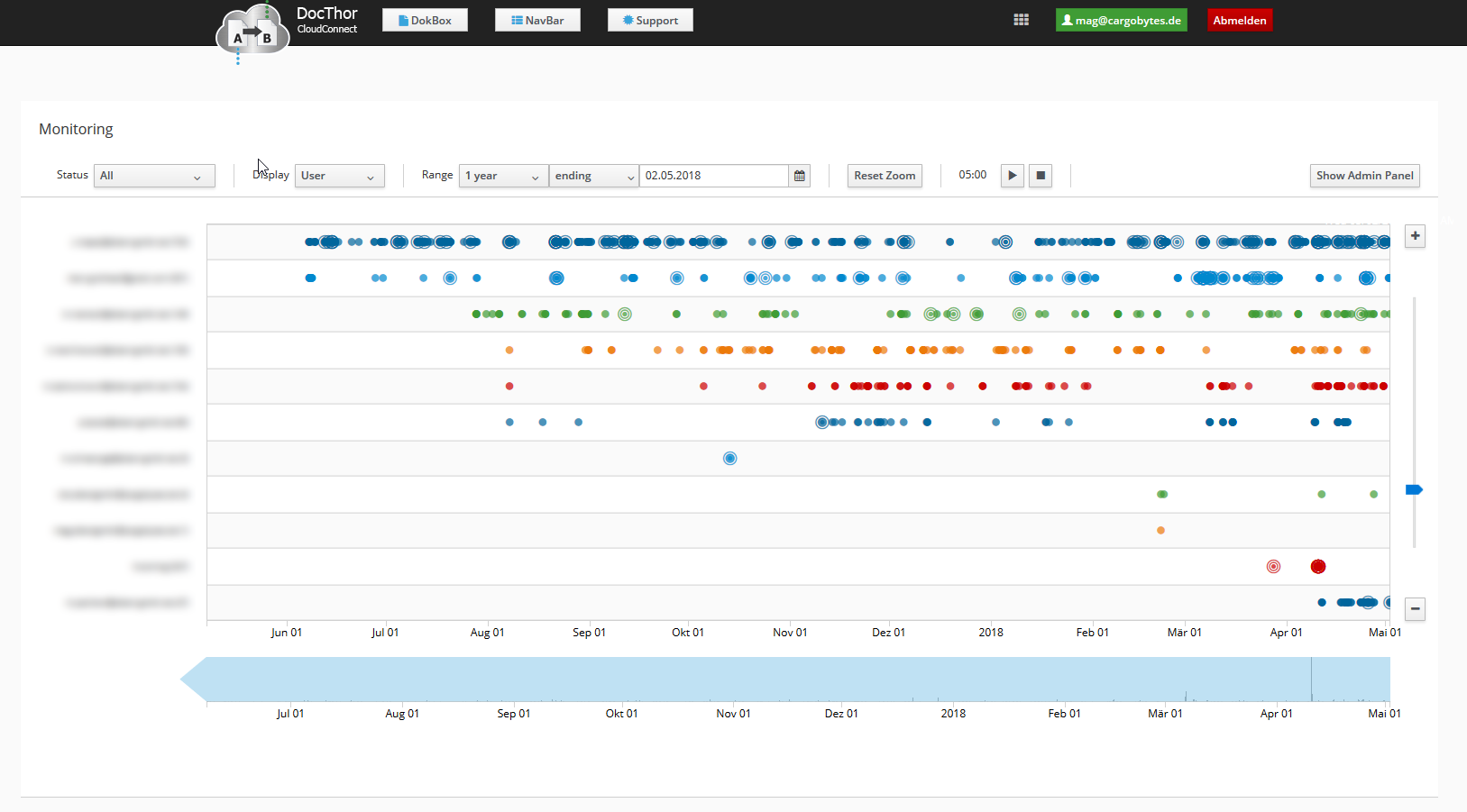
Monitoring

With Monitoring you get an timeline overwiew with definable range of the company documents,
their status and other belonging informations.

Screenshot of the Monitoring:


[icon name=“arrow-left“]  Back to Overview

Group management & Document assignment

Group management & Document assignment

DocThor CloudConnect has an intelligent group management.
You can define user groups for specific purposes e.g. responsibility for documents.
You can assign specific documents or document types to predefined user groups.
Every user can set his/her account in „Time Off“ mode.

Use case with full automation(Job Scheduler) of documents picked up from a mailbox:

  • Documents will get imported and automatically processed by the Job Scheduler by a defined schedule.
  • The Job Scheduler will assign documents only to users in the specified group that are available.
  • The document will get put into the users mailbox.
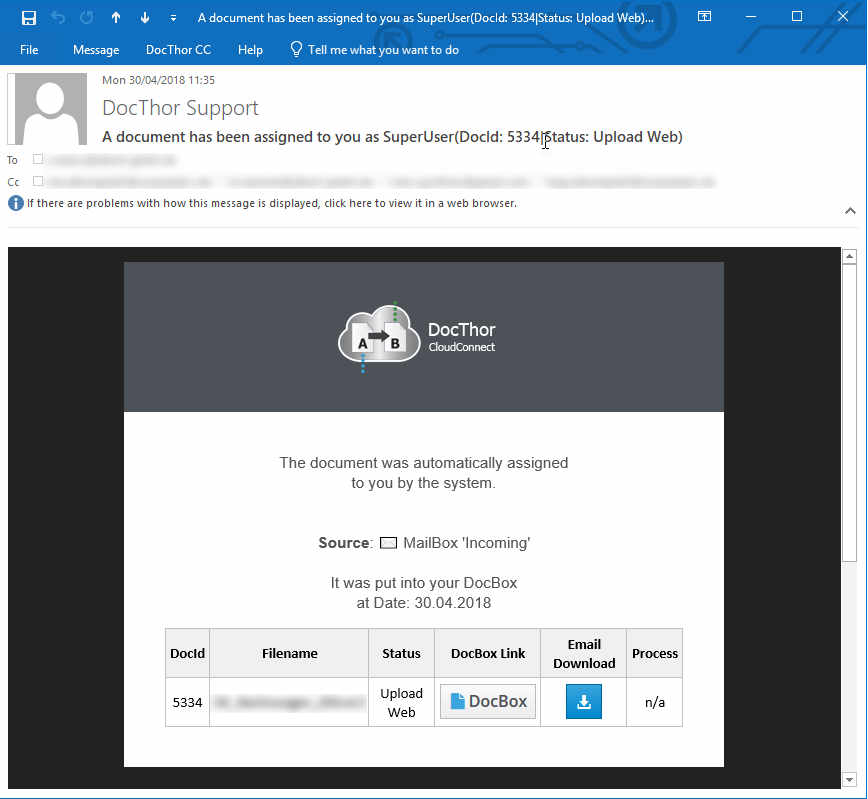
  • The responsible user will receive an info mail that a document was ‚Completed‘ or that they have to take action on that document.

Example of Assign Email:

[icon name=“arrow-left“ class=““ unprefixed_class=““]  Back to Overview